A quick quiz at the end of a lesson can do a lot. It wakes a room up, shows you what stuck and gives quieter pupils a way to join in. But in most classrooms the same few hands go up first, the fastest tappers win, and the pupils who need a little more time or a clearer question drift out of the game.
We built Otiya for Schools to change that. One live quiz, run by the teacher at the front, with every pupil able to take part in a way that works for them.
What Otiya for Schools gives you
A shared quiz library for your staff. Every educator gets their own login. Quizzes saved to your school workspace are shared with colleagues, so a good Year 5 science quiz written by one teacher can be used by the whole department. Your personal quizzes stay personal.
Classes and groups without pupil accounts. Set up a class or group once, with its usual pace and scoring. Pupils never create accounts. They join with a game code on any device, pick a nickname and play. There are no pupil lists to upload.
Inclusive Live. This is the heart of it. The whole room plays the same quiz at the same pace, and you can score on accuracy rather than speed, so thinking carefully is rewarded instead of tapping first.
Class-level insights. See how a session went across the class, with participation and staff feedback in one place. We don't show individual pupil scores.
How Inclusive Live works in the classroom
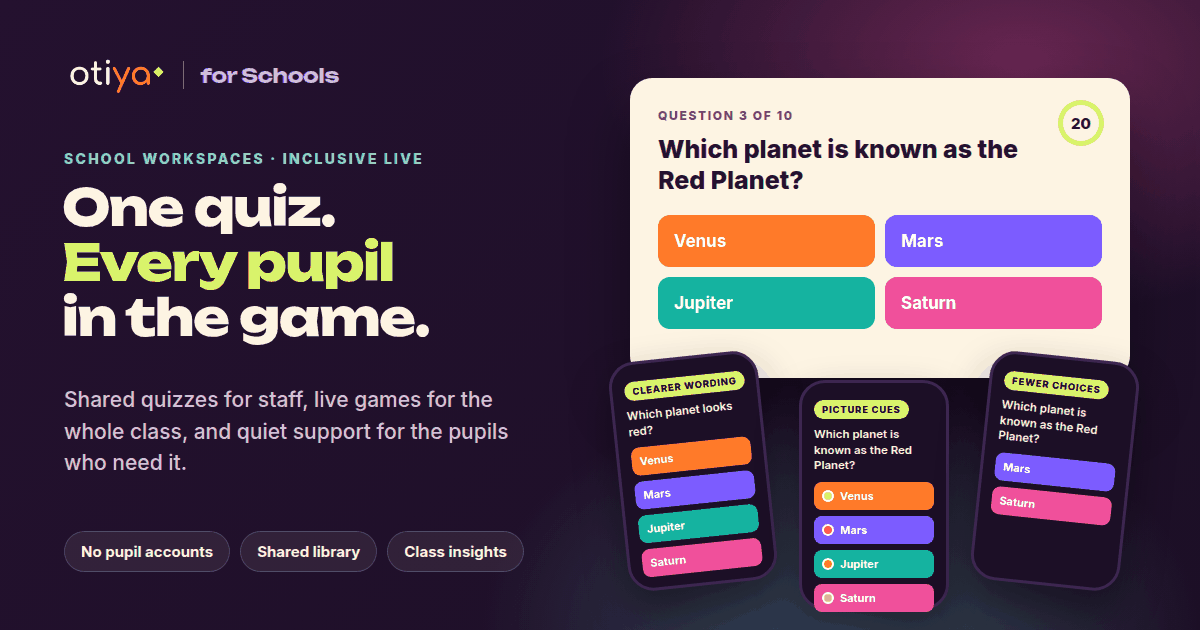
When you run a game in Inclusive Live, each pupil can quietly choose the support that helps them on their own screen. Nobody else in the room can see who is using what, and the big screen at the front looks the same for everyone.
Pupils can choose things like:
- Clearer wording, a simpler version of the question when one has been approved
- Picture cues, small symbols next to the answers
- Fewer choices, so the question shows two or three answers instead of four
- Read aloud, so the question is spoken on their device
- More time, with the room set to a relaxed pace
The correct answer never changes, only how the question is presented. Everyone is still playing the same game, together.
Better questions, with you in charge
Writing clearer versions of every question takes time, so Otiya AI can help. Open any quiz in Quiz Studio and choose Make this quiz more inclusive. Otiya AI suggests clearer wording and picture cues for each question.
Nothing changes until you approve it. You tick the suggestions you want, edit anything that isn't quite right and apply them. The approved support is saved with your quiz and shown only to the pupils who choose it during Inclusive Live. If you prefer a clearer version for the whole class, one tap uses it for everyone.
You decide what pupils see. Otiya AI suggests, and the teacher approves.
Practise before the real thing
Not sure how a quiz will land? Run a practice game before the lesson. It plays exactly like the real thing, so you can check timings and questions, and practice runs stay out of your reports.
Built with schools in mind
We know schools need to be careful with data, so Otiya for Schools is designed to collect as little as possible:
- No pupil accounts and no pupil names needed
- Nicknames only, chosen at the start of each game
- No diagnoses or personal information about support needs, because pupils simply choose what helps
- Support settings are kept on the pupil's own device
Your DPO and IT lead can review how it all works before you roll it out.
Who it is for
Otiya for Schools is for primary and secondary schools, SEND settings, tutoring groups and anyone teaching a room full of learners who don't all learn the same way. It works on the devices you already have, with no app to install: a screen at the front and a phone, tablet or laptop for each pupil or pair.
Try it with your school
Otiya for Schools is in beta, and we are working with schools to shape what comes next. If you would like to try it with your staff or talk through how it could fit your classrooms, we would love to hear from you.
Explore Otiya for Schools or speak to us about your school.
If you're teaching at home, take a look at Otiya Kids, our free learning games for ages 6 to 12.